Finance Calendar data products
Economic calendar API for apps and AI
International release schedules.
US forecasts and results. Paid API access from US$9.99/year.
Build richer release watchlists, market briefings and AI research workflows with forecasts, results and source context. Browse the public calendar for free, or connect your app with Starter.
Connect international release dates with expanded US consensus, actual and prior data across 12 series—including CPI, nonfarm payrolls, PCE inflation, retail sales and both ISM PMIs. Use REST, hosted MCP, CLI or Python.
Inspect a recorded API sample
Explore publisher-selected records, recorded values and source credits before connecting your app. The fixed JSON sample needs no account or key. Paid plans add configurable figures, wider dates and integration tools.
Open the recorded JSON sample · Sample guide · Compare paid API plans
Dates, figures and sources. One feed.
Put release dates, consensus forecasts and reported results into your app, research workflow or AI assistant.
Economic releases
Release schedules plus expanded consensus, actual and prior data across 12 US series.
Central bank decisions
Rate decisions and monetary-policy meeting schedules.
Market holidays
Exchange closures and recorded early closes.
Selected crypto events
Token unlocks, DAO votes, network upgrades and supply projections.
- Stay in sync. Stable IDs and recorded changes help you update an existing calendar.
- Fit your workflow. Filter by country, date, series and impact. Use JSON, CSV or ICS.
- Keep the context. Use consensus, actual and prior figures with reporting months, timing precision and field-level source evidence.
4,782 calendar records · 411 declared and recorded series · 16 countries and areas. Inspect measured coverage.
Add a broader US numerical layer to your calendar: 12 release series alongside international schedules, rate decisions, holidays and selected crypto events.
Build a calendar dashboard.
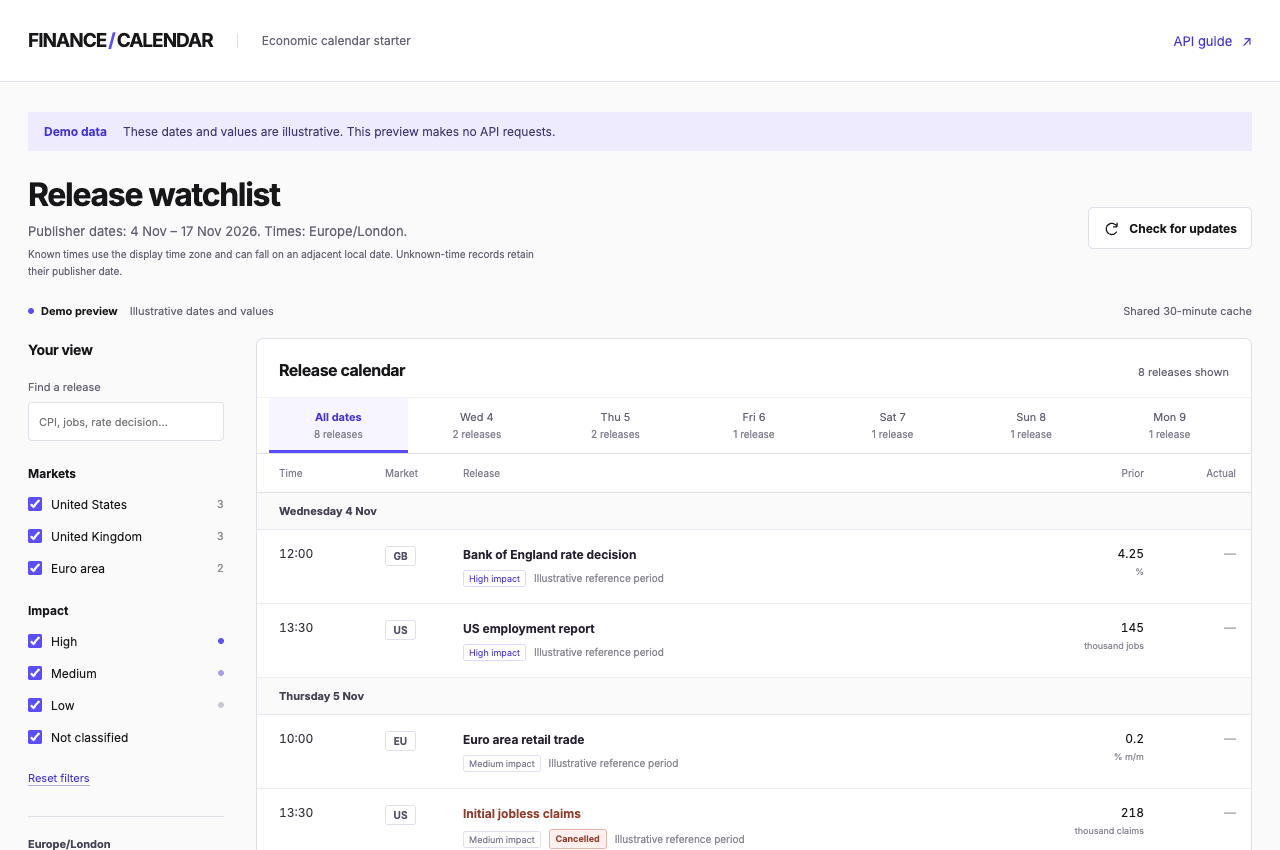
Start with a working Node backend, release calendar, browser filters and source details.
Run the sample locally
From a checkout of the public repository, open integrations/examples/economic-calendar-dashboard and run:
npm run demoDemo mode uses labelled illustrative data. Add your API key in your server environment to connect recorded data.
Build it with your AI coding assistant
Copy this brief, then provide your API key through your server’s private settings.
Build a source-aware release watchlist for people and AI research workflows.
Start from the working Finance Calendar dashboard:
https://github.com/awarenessdays/financecalendar-api/tree/main/integrations/examples/economic-calendar-dashboard

Read the public OpenAPI contract:
https://raw.githubusercontent.com/awarenessdays/financecalendar-api/main/openapi.json
MCP guide: https://www.financecalendar.com/api/mcp/
CLI and Python guide: https://www.financecalendar.com/api/cli/

Keep FC_API_KEY only in the server environment. Cache API responses and keep browser filters local where practical.
Preserve source credits,
unknown release times, null versus zero and stale-source flags. Keep demo records
clearly labelled. Run the starter's existing tests before changing its behaviour.Choose the plan for your workflow.
Start with Starter at US$9.99/year, add API capacity with Build, or download the complete dataset with Scale. Every paid plan includes release figures, hosted MCP, Data explorer, filtered exports, webhooks and captured-provider as-of reads.
Annual planStarter · one yearly price
Starter
Build with release figures and integration tools.
US$9.99 / yearBilled yearly
Paid upfront for one year. Cancel renewal anytime.Keep access until your paid year ends.
Charged upfront each year. Renews yearly until cancelled. Applicable tax included.
Build apps, research tools and automated watchlists.
- Customer-facing commercial apps included
- Recorded US forecasts, actual and prior figures across 12 headline series
- 1,000 API requests per day
- 25,000 API requests per calendar month
- Data explorer, saved views and filtered or selected CSV/JSON exports
- REST, MCP, CLI and Python access
- Up to three active keys sharing one account allowance
Create an account and confirm your email, or sign in, then complete secure payment. Account creation does not charge you.
Flexible billingMonthly or yearly for Build & Scale
Build
Connect a growing app.
US$95.90 / yearBilled yearly
Paid upfront for one year. Cancel renewal anytime.Keep access until your paid year ends.
Charged upfront each year. Equivalent to US$7.99/month; save 20% compared with 12 monthly payments. Renews yearly until cancelled. Applicable tax included.
For apps, dashboards and research tools that need a higher daily allowance.
- Customer-facing commercial apps included
- 100,000 API requests per day
- REST, MCP, CLI and Python access with the same recorded fields and source evidence
- Data explorer, saved views and filtered or selected CSV/JSON exports
- Up to three active keys sharing one account allowance
Create an account and confirm your email, or sign in, then complete secure payment. Account creation does not charge you.
Scale
Complete dataset includedTake the complete dataset with you.
US$278.40 / yearBilled yearly
Paid upfront for one year. Cancel renewal anytime.Keep access until your paid year ends.
Charged upfront each year. Equivalent to US$23.20/month; save 20% compared with 12 monthly payments. Renews yearly until cancelled. Applicable tax included.
For complete dataset downloads and integrations with a larger daily audience.
- Customer-facing commercial apps included
- 1,000,000 API requests per day
- Full dataset JSON export included. Download the complete current snapshot, with recorded series, exchanges, source evidence and the retained change log.
- Data explorer, saved views and filtered or selected CSV/JSON exports
- Up to three active keys sharing one account allowance
Create an account and confirm your email, or sign in, then complete secure payment. Account creation does not charge you.
Free Developer
US$0 · ongoing schedule access
Prototype with economic-release and central-bank schedules. Use JSON /calendar and /today from UTC today through today+6, with country, impact and bounded date filters.
- 100 successful schedule JSON responses per UTC calendar month, up to 10/day
- One key after email verification; up to 20 records per response, with explicit truncation and no pagination
- No card, fixed expiry or automatic paid subscription. Monthly allowance renews.
- Personal and customer-facing projects within these limits and applicable source terms
Add structured forecasts, actual and prior figures, wider dates, CSV/ICS, hosted MCP, Data explorer and webhooks with Starter — US$9.99/year.
Free counts successful schedule responses; paid plans retain admitted-request metering. Keep source credits. A small cached schedule can remain free.
What changes when I upgrade to Starter?
Starter adds recorded figures, history, wider dates and paid integration tools. Keep your existing active API key linked to the same verified account when paid access is confirmed. Free Developer and paid access use different JSON response schemas: Free returns compact schedules and omits numerical fields; paid access adds richer event fields and endpoint-specific responses. Use the documented paid response model when adding these features, including the different /today envelope. Compare Free and paid response models.
Billing and cancellation help
Cancel renewal anytime in your account; access continues until the end of your paid billing period. Open Plan & billing, choose Manage or cancel subscription, then confirm cancellation in Stripe. You can also manage payment details and view invoices there. Service and cancellation terms.
Expanded US release data combines consensus forecasts with actual and prior figures across 12 headline series. Use the same records and field-level source evidence in your app, notebook or AI assistant. Explore the expanded data and sources.
More ways to build, shaped by your feedback.
Bring more release dates and update tools into your app.
- More international schedules. Official-source calendars for Canada, Switzerland, New Zealand and Germany, plus Eurozone Sentix investor confidence.
- Separate core inflation dates. Follow US Core CPI and Core PPI as distinct calendar entries.
- Central-bank speaking engagements. Add selected Fed, ECB, Bank of England and other covered speakers to your API watchlist.
- Keep your integration in sync. Receive signed notifications when calendar updates are published, and use as-of reads to inspect captured provider editions at a selected cutoff.
For people, apps and AI agents.
Work with the same recorded calendar through the tools you use.
Explore and export
Search releases, save your views and export selected or filtered records in the Data explorer.
Open the Data explorerConnect an AI assistant
Use hosted MCP with a compatible client, or the local MCP server, to query release dates, forecasts, results and source evidence with your API key.
Connect ChatGPT or ClaudeBuild your integration
Use the REST API, CLI or Python client for a dashboard, country watchlist or daily market briefing.
REST setup · CLI and Python · Trading tools and botsLinked keys and MCP data calls share your account allowance. Clients have tested GitHub downloads and a public source repository.
Developer quickstart and response example
Make your first call.
Choose your access, verify your email and create a key. Free Developer provides its bounded JSON schedule; complete paid checkout for figures, wider dates and tools. Keep FC_API_KEY in your server environment.
curl "https://www.financecalendar.com/wp-json/fc/v1/calendar?country=US,GB&impact=high&limit=5" \
-H "X-API-Key: $FC_API_KEY"const response = await fetch("https://www.financecalendar.com/wp-json/fc/v1/calendar?country=US,GB&impact=high&limit=5", { headers: { "X-API-Key": process.env.FC_API_KEY } });
if (!response.ok) throw new Error(`Calendar HTTP ${response.status}`);
const { events, total } = await response.json();
console.log(total, events);import json, os
from urllib.request import Request, urlopen
request = Request("https://www.financecalendar.com/wp-json/fc/v1/calendar?country=US,GB&impact=high&limit=5", headers={"X-API-Key": os.environ["FC_API_KEY"]})
with urlopen(request, timeout=30) as response:
calendar = json.load(response)
print(calendar["total"], calendar["events"])Paid requests support JSON, CSV or ICS and up to 500 calendar records. Free Developer supports its two JSON schedule routes, up to 20 records per response within seven UTC dates.
Inside a calendar event
Recorded data{
"id": "us-employment-situation-non-farm-payrolls-november-2026",
"series_code": "us-nfp",
"country": "US",
"date": "2026-11-06",
"release_at_utc": "2026-11-06T13:30:00+00:00",
"release_tz": "America/New_York",
"time_precision": "minute",
"period": "2026-10",
"status": "released",
"consensus": "65000",
"actual": "165000",
"prior": "60000",
"unit": "jobs",
"source_name": "U.S. Bureau of Labor Statistics",
"source_url": "https://www.bls.gov/news.release/empsit.nr0.htm",
"last_verified_at": "2026-11-12T16:39:17.268258+00:00",
"data_stale": false,
"source_license": null
}Selected fields from a real record in the current snapshot. Paid plans include the recorded numerical fields; Free Developer uses a separate schedule-only schema. Read the calendar endpoint reference.
Responses keep the reporting month, source evidence and timing precision alongside each value. A null field means no value is recorded; zero remains a value. API key limits and setup.
Coverage and sources
Connect the expanded US numerical feed with the release schedule, then inspect source context at field level. Explore the headline metrics and sources.
Expanded US release data: Eight more US series—CPI, nonfarm payrolls, PPI, retail sales, PCE inflation, ISM Manufacturing PMI, industrial production and Conference Board Consumer Confidence—join JOLTS, ADP employment, ISM Services PMI and Trade Balance. Bring consensus forecasts, actual and prior figures, reporting months and field-level source evidence into one integration across 12 US headline series.
Stable event IDs keep watchlists, saved views and existing integrations connected as release data is refreshed. Use the same dataset through REST, hosted MCP, CLI and Python.
Field definitions, timing and reuse
The 12-series US numerical feed combines provider consensus with supported official and provider-backed actual/prior figures. Headline measures retain their units and reference periods. Values are populated from the evidence recorded for each occurrence; null remains distinct from zero. Source verification and build timestamps describe separate collection steps.
Known instants, date-only schedules, publication windows and estimates retain their timing precision. Recorded history includes provider backfill and current-vintage results; it does not establish original first prints or verified pre-release availability for every historical forecast.
Starter, Build and Scale all include API access for your own tools, apps and products. Preserve Finance Calendar attribution and publisher credits, source licences and reuse terms. See the API service terms, including earlier grants and independent source rights.
Snapshot window: 2025-11-12 to 2027-12-17. Individual series may cover less.
Built . Build time is separate from source verification.
Put the feed to work.
Build your first integration with Starter, or compare plans for more capacity and complete dataset downloads.
Full REST API reference · Expand the technical reference below for endpoints, filters, examples and attribution.
API reference
The Finance Calendar API combines expanded consensus, actual and prior data across 12 US release series with economic-release schedules, central bank decisions and exchange holidays. Build through REST, hosted MCP, CLI or Python, and use JSON, CSV or ICS. Choose a plan, then connect the dates, figures and field-level source evidence to your workflow.
Open the full REST API reference, or expand the examples and usage details below.
API examples, authentication and usage details
Use one interface for a macro-event dashboard, research briefing, release-risk workflow or spreadsheet calendar. Expanded US numerical coverage adds consensus, actual and prior figures for CPI, payrolls, PPI, retail sales, PCE inflation, ISM Manufacturing, industrial production and Consumer Confidence alongside JOLTS, ADP, ISM Services and Trade Balance. Explore the headline metrics and source evidence.
Create an account, confirm your email and complete the activation steps shown in your workspace. Set FC_API_KEY in your server environment, then run:
curl "https://www.financecalendar.com/wp-json/fc/v1/calendar?country=US,GB&impact=high&limit=5" \
  -H "X-API-Key: $FC_API_KEY"
Read the API key setup guide or search the calendar in your browser. Use the same dataset through MCP for AI assistants, the CLI and Python client, or the REST endpoints below. Browse today and this week for a ready-made calendar view.
Open the Data explorer to search and filter calendar records and available numerical observations, inspect source evidence, and export matching results or selected rows as CSV or JSON. Create an account, confirm your email and complete the activation steps shown in your workspace. See the current plans for Data explorer, saved-view and filtered-export access. API request allowances vary by plan; Scale also includes complete snapshot file downloads. REST, hosted MCP, CLI and Python require an API key.
Base URL
https://www.financecalendar.com/wp-json/fc/v1Production data routes, authenticated metadata and status routes, and hosted MCP require an API key. The OpenAPI schema (/openapi), current offer (/product-offer) and fixed recorded JSON sample (/sample) are public and require no account or API key. Starter includes 1,000 data requests/day and 25,000 per calendar month, Build 100,000 per day and Scale 1,000,000 per day. Numerical data, wider routes and paid tools require an active paid plan; Free Developer permits its bounded schedule scope. Linked keys and hosted MCP data calls share that account allowance. Check your usage response for the actual limit. Authenticated responses use private/no-store cache headers. Invalid parameters return HTTP 400; missing or invalid keys return HTTP 401.
Endpoints
| Endpoint | What it returns | Parameters |
|---|---|---|
/calendar |
Events in a date range, soonest first | from, to (YYYY-MM-DD, default today + 14 days, at most 92), country, impact, category, series, status, include=holidays, tz, limit (1 to 500), offset, format (json, csv, ics) |
/today |
Today’s releases, live NYSE status and any exchange closures today | country, tz |
/week |
This week, Monday to Sunday, or next week | which (this or next), country, impact, tz |
/next |
The next occurrence of a series | series (code, alias or keyword), country, tz |
/series |
Every series with code, aliases, country, impact and next date | country, category, kind (instance or holiday) |
/series/{code} |
One series: next, last, upcoming, history, long-run dataset where published | tz |
/history |
Recorded release history with consensus, actual and prior data where supported | series, from, to, limit, tz |
/holidays |
Exchange holidays and early closes | exchange (nyse, sifma, cme, lse, tsx, asx, hkex, euronext, jpx, six, xetra, nse or all), year |
/market-status |
Is the exchange open now, with session hours and the next holiday | exchange |
/changes |
Change log: recorded changes to dates and values | since (ISO 8601, default 24 hours ago, at most 30 days), series, change (added, updated, removed), limit |
/countries |
Countries covered, with series and event counts | none |
/status |
Snapshot age and counts | none |
/openapi |
OpenAPI 3.1 description of everything above | none |
Filters
- country: US, GB, EU, DE, JP, CA, AU, CN, CH, NZ, NO, SE, IN, HK, comma-separated;
ukandeurozoneaccepted. - impact: high, medium, low. category: economic-indicators, central-banks-monetary-policy, market-holidays. status: confirmed, estimated, released, rescheduled, cancelled.
- series: codes or aliases from
/series(us-cpi,fomc,uk-cpi), comma-separated. - include=holidays: mixes market-holiday rows in; they are otherwise left out of
/calendar. - tz: an IANA zone such as Europe/London; adds
time_localfor known instants. Exact UTC and Eastern times are nullable. Date filters use the recorded publisher date; a converted local time may fall on another calendar day. - limit and offset: paging. List responses carry
countandtotal.
Examples
When is the next Fed decision?
curl "https://www.financecalendar.com/wp-json/fc/v1/next?series=fomc" \
  -H "X-API-Key: $FC_API_KEY"
When is the next UK CPI print, in London time?
curl "https://www.financecalendar.com/wp-json/fc/v1/next?series=uk-cpi&tz=Europe/London" \
  -H "X-API-Key: $FC_API_KEY"
Every high-impact US and UK release in the next two weeks:
curl "https://www.financecalendar.com/wp-json/fc/v1/calendar?country=US,GB&impact=high" \
  -H "X-API-Key: $FC_API_KEY"
What changed since yesterday:
curl "https://www.financecalendar.com/wp-json/fc/v1/changes" \
  -H "X-API-Key: $FC_API_KEY"
From your server-side JavaScript app (keep the key out of browser code):
const r = await fetch("https://www.financecalendar.com/wp-json/fc/v1/today", {
  headers: { "X-API-Key": process.env.FC_API_KEY }
});
const { market, events } = await r.json();
Response shape
Example response recorded on 19 October 2026 for /next?series=fomc. Dates and values change; run the request for the current response:
{
  "series": "fomc",
  "series_code": "fomc",
  "country": "US",
  "next": {
    "id": "fomc-rate-decision-october-2026",
    "series_code": "fomc",
    "series_name": "FOMC Rate Decision",
    "name": "FOMC decision",
    "title": "FOMC Rate Decision October 2026",
    "country": "US",
    "category": "central-banks-monetary-policy",
    "impact": "high",
    "date": "2026-10-28",
    "release_at_utc": "2026-10-28T18:00:00+00:00",
    "time_utc": "2026-10-28T18:00:00+00:00",
    "time_et": "14:00",
    "release_tz": "America/New_York",
    "all_day": false,
    "period": null,
    "status": "confirmed",
    "consensus": null,
    "prior": null,
    "actual": null,
    "unit": "% target range",
    "source_url": "https://www.federalreserve.gov/monetarypolicy/fomccalendars.htm",
    "source_name": "Federal Reserve",
    "url": "https://www.financecalendar.com/event/fomc-rate-decision-october-2026/",
    "exchange": null,
    "holiday_status": null,
    "close_time_local": null,
    "updated_at": "2026-10-19T16:02:05+00:00",
    "starts_on": "2026-10-27"
  },
  "attribution": {
    "source": "financecalendar.com",
    "terms": "Use is governed by https://www.financecalendar.com/api/terms/ and any separately agreed licence. Earlier grants and source-specific rights are preserved. Retain attribution and publisher notices.",
    "docs": "https://www.financecalendar.com/api/"
  }
}
The numerical fields combine provider consensus with supported official and provider-backed actual/prior values across 12 US headline series. Each value keeps its metric, reference period and field evidence. Individual occurrences may contain null values; zero remains a value. Historical provider records may not verify pre-release availability or original first prints. Read the metric coverage and provenance guide for technical detail.
release_at_utc, time_utc and display-time fields can be null. Date-only rows retain the publisher date; null is not midnight. Published ranges use time_window_start and time_window_end, with time_precision="range". Do not present the range start as an exact release time. Treasury records with time_role="auction-close" identify the bidding close, not the publication of results. Reference period, release_stage and publisher-native IDs are included where recorded.
starts_on is set for multi-day meetings. exchange, holiday_status and close_time_local apply to market-holiday rows.
CSV and ICS
Add format=csv to a /calendar or /week query for a spreadsheet download, or format=ics for a calendar file. Download it with your header-authenticated client, then import the file into Google Calendar, Outlook or Apple Calendar. The examples below open API key setup with the selected request.
- October to December 2026, every release (CSV with API key)
- October to December 2026, high impact only (CSV with API key)
- October to December 2026, selected exchange holidays (CSV with API key)
- Fed, ECB, BoE and BoJ decisions through 19 January 2027 (ICS with API key)
- NYSE holidays 2027 (JSON with API key)
Google Sheets users should use the authenticated Apps Script guide; IMPORTDATA cannot attach the required API-key header. Schedule hubs link to API setup for series-specific downloads. Fetch an ICS file with your key, then import it into your calendar; do not put a key in a subscription URL.
Full dataset
The complete current calendar dataset is available as a JSON download on the Scale plan. Sign in to download the full dataset, or send your Scale API key in an X-API-Key header to GET /wp-json/fc/v1/account/full-export. Each download checks your active Scale subscription; Starter and Build do not include the complete snapshot download. The export retains the recorded series, exchange table, source evidence and 30-day change log. The build workflow is scheduled hourly; inspect the file’s generation time and source status. Filtered API responses remain available within your plan allowance. The OpenAPI spec and client code remain in the public repository at github.com/awarenessdays/financecalendar-api.
API key setup
Programmatic data requests use an account key and the entitlement for the requested scope. Free Developer uses its successful-schedule-response allowance; paid keys share their existing admitted-request allowance. Inspect the public data sample before creating an account. Create an account, confirm your email and complete the activation steps shown in your workspace, then choose “Create API key”. The full key is shown once. Existing issued keys keep working. New keys are created in the verified account workspace; the former anonymous registration route returns HTTP 403:
Create an account to create a new key, or sign in to manage existing keys.
Send it as an X-API-Key or Authorization: Bearer header. Keep credentials out of URLs. Usage is at /keys/me; details on the key page.
Rate limits
For paid plans, daily and monthly quota usage counts admitted requests, not successful responses. Requests refused with HTTP 429 do not consume more allowance; a request that passes the quota check can still consume allowance if it later returns an error. Free Developer instead counts successful committed HTTP 200 schedule JSON responses; invalid requests, denied requests and failures before commitment do not consume its successful-response allowance. Retained per-key request history remains a separate attempt diagnostic and can include rejected requests.
| Plan | Billing choices | Requests per UTC day | Requests per UTC calendar month |
|---|---|---|---|
| Starter | US$9.99/year | 1,000 | 25,000 |
| Build | US$9.99/month or US$95.90/year | 100,000 | No separate monthly cap |
| Scale | US$29.00/month or US$278.40/year | 1,000,000 | No separate monthly cap |
Annual prices are charged upfront; subscriptions renew until cancelled. Linked keys share account limits. Scale includes the complete current dataset download. Machine-readable current offer.
Daily limits reset at 00:00 UTC. Monthly allowances reset at 00:00 UTC on the first day of the next calendar month. Richer data and tools require paid access; Free Developer permits its bounded schedule scope; all linked keys share that plan allowance. Authenticated data responses carry X-RateLimit-Limit, X-RateLimit-Remaining, X-RateLimit-Reset and X-RateLimit-Tier. Compare current plans and availability on our API plans page.
Errors
API errors are JSON with an error message. Parameter errors also include a docs link. 400 is a bad parameter:
{
  "error": "tz must be an IANA timezone such as Europe/London or Asia/Tokyo.",
  "docs": "https://www.financecalendar.com/api/"
}
401 means an API key is missing or invalid. 404 is an unknown series or no upcoming event. 429 means the account has reached its daily or monthly allowance. The period is day or month; reset_at gives the applicable reset time and Retry-After gives the wait in seconds. All account keys share these limits. Wait for the indicated reset or review the plans at upgrade_url. There are no automatic charges; a paid plan starts only when you choose it and complete checkout.
Illustrative Starter monthly-limit response with a 1 December 2026 reset. Use the actual response’s reset_at and usage values in your application:
{
  "error": "Your account monthly allowance of 25,000 requests has been reached. All your keys share this allowance. Wait until 1 Dec 2026 00:00 UTC or upgrade at https://www.financecalendar.com/api/#plans. No automatic charges apply.",
  "code": "quota_exceeded",
  "period": "month",
  "scope": "account",
  "plan": "starter",
  "limit": 25000,
  "used": 25000,
  "remaining": 0,
  "reset_at": "2026-12-01T00:00:00+00:00",
  "upgrade_url": "https://www.financecalendar.com/api/#plans",
  "daily_limit": 1000,
  "used_today": 1,
  "monthly_limit": 25000,
  "used_this_month": 25000
}
503 (“Calendar data is being rebuilt”) means retry in a minute.
MCP server, CLI and Python
The Node MCP server and CLI, and the Python client, use this same REST API. Start with the MCP setup guide or CLI and Python guide. Tested Node 0.2.3 and Python 0.1.3 archives are available from the GitHub release; npm and PyPI listings are pending. The guides include exact download commands and a source checkout alternative.
Build a working dashboard
Start from the economic calendar dashboard example: a complete Node backend and responsive browser view with no runtime packages. Try the labelled demo without a key, then connect your own activated account. The key stays on the server; a shared 30-minute cache and local browser filters reduce upstream API requests. Frequent restarts or multiple server processes can increase consumption.
Copy this into your coding assistant, then configure your key in the server’s private environment settings:
Use the economic-calendar-dashboard starter from
https://github.com/awarenessdays/financecalendar-api/tree/main/integrations/examples/economic-calendar-dashboard
Read its README and run its tests. Keep FC_API_KEY server-side, preserve the
shared 30-minute cache and failure cooldown, and filter locally in the browser.
Preserve source credits, unknown times, missing values versus zero and stale
flags. Keep demo records clearly labelled. Adapt the working app to my needs.
The REST reference and OpenAPI guide describe the HTTP contract. Fetch the public /openapi schema without an account or API key. The endpoint guide explains date filters, pagination, timezones and missing values.
Guides
Economic calendar, FOMC dates, CPI dates, jobs report dates, GDP dates, central bank calendar, market holidays, market status, forex calendar, widget, changelog.
Frequently asked questions
Can I use an ongoing free API?
Free Developer schedules: 100 successful HTTP 200 schedule JSON responses per UTC calendar month, up to 10 per UTC day, one key after email verification and no card or automatic paid subscription. Use /calendar and /today for economic-release and central-bank schedules from UTC today through today+6, with country/impact filters, up to three country codes, optional dates narrowing that window and up to 20 records per response. Responses identify truncation; pagination, numerical figures, history, other formats, hosted MCP and Data explorer require paid access. The allowance renews monthly. Ordinary personal or customer-facing projects are allowed within the scope and applicable source terms. Create Free Developer account; add recorded figures and paid tools with Starter — US$9.99/year.
Do I need an API key?
Production data routes, status and hosted MCP require an API key. The OpenAPI schema (/openapi), current offer (/product-offer) and fixed recorded JSON sample (/sample) are public and require no account or API key. Create an account, confirm your email and complete the activation steps shown in your workspace before creating a key. Your plan and usage response show your applicable allowance.
How fresh is the data?
Release schedules follow the hourly snapshot workflow, with dedicated collection refreshing mapped US numerical data and polling more frequently around supported release times. API responses use private/no-store cache headers. Query /status and inspect collection timestamps and field evidence for the releases you use; the coverage guide explains these technical signals.
Can I build an app for customers?
Yes. Starter, Build and Scale can power websites and apps for your customers, including paid products, within plan limits and with attribution. See the API service terms for scope, earlier grants and independent source rights.
Are earnings dates included?
No, because of upstream licensing. Economic data, central bank decisions and exchange holidays are all included.
Attribution and fair use
Attribution means a visible link to https://www.financecalendar.com near where the data is shown, or on your app’s about or credits page; “Finance Calendar” or “financecalendar.com” as link text is fine. You may cache and build on the data in your own tools, apps and products within your plan. Keep the attribution object in any files you share, and retain publisher credits and source terms. The API service terms preserve earlier grants and rights independently supplied by original sources. Earnings dates are not included. Building something with this? We may feature it: get in touch.