The numerical, series-specific and wider-date examples in this tutorial use paid API access. Ordinary Python HTTP code can also call Free Developer’s bounded /calendar and /today JSON schedule routes; that does not add the paid fields or endpoints.
Contents
Bring CPI release dates, release forecasts, provider consensus and published results into Python with the Finance Calendar API. Paid event rows carry release forecasts for 60 headline measures across 10 economies, including US CPI. US headline CPI is now part of the expanded consensus coverage across 12 selected US release series, with actual/prior values, reference periods and source evidence alongside the schedule. This guide shows how to query and compare those records using urllib, requests, pandas and the financecalendar package.
The Finance Calendar API requires an account and API key and returns JSON. Create a key and set FC_API_KEY in your server environment before running these examples. US CPI is series code us-cpi (alias cpi); the UK, euro area, Germany, Japan, Canada, Australia and China have their own codes, listed on the CPI release dates API page. The recorded US CPI example was checked on 10 November 2026. Other dated code examples illustrate query structure; update their explicit date windows and run the requests for current records.
Programmatic API access requires an active paid plan. Existing paid customers retain their contracted prices and applicable allowances; inspect your account or key usage response for the effective limit.
1. The next CPI date with the standard library
import json
import os
import urllib.request

BASE = "https://www.financecalendar.com/wp-json/fc/v1"

def get(path):
    req = urllib.request.Request(BASE + path, headers={"User-Agent": "cpi-script/1.0", "X-API-Key": os.environ["FC_API_KEY"]})
    with urllib.request.urlopen(req, timeout=20) as r:
        return json.load(r)

nxt = get("/next?series=cpi")["next"]
print(nxt["date"], nxt["time_et"], "ET", nxt["time_utc"])
print("period:", nxt["period"], "| consensus:", nxt["consensus"], "| prior:", nxt["prior"])
For the UK, change the next-date query’s series to uk-cpi.
Recorded US CPI history response (selected fields)
Use this separate history request to inspect the October US release’s forecast and result:
recorded = get("/history?series=us-cpi&from=2026-10-14&to=2026-10-14&limit=1")["events"][0]
print(json.dumps(recorded, indent=2))
Recorded API response, checked 10 November 2026: selected fields from the returned US CPI event.
{
  "id": "us-cpi-report-october-2026",
  "series_code": "us-cpi",
  "date": "2026-10-14",
  "release_at_utc": "2026-10-14T12:30:00+00:00",
  "unit": "% y/y",
  "consensus": "3.6",
  "actual": "3.7",
  "prior": "3.4",
  "source_url": "https://www.bls.gov/news.release/cpi.nr0.htm"
}
Use time_utc, status and timing precision for scheduling, and consensus, prior and actual for covered release comparisons. US headline CPI uses all-items CPI-U, year-on-year, not seasonally adjusted. Read its unit, reference period and source evidence with the value. Parse non-null time_utc with datetime.fromisoformat to convert an exact instant. Date-only rows preserve the publisher date; ranges use time_window_start, time_window_end and time_precision="range". Preserve null for unrecorded values and times; a range start is not an exact alert time.
2. Convert the time to your zone
For a record with a non-null time_utc, use the following conversion. The output comments illustrate the recorded UK example above; your current next-release response can have a different date and time.
from datetime import datetime
from zoneinfo import ZoneInfo

t = datetime.fromisoformat(nxt["time_utc"])          # aware datetime, UTC
print(t.astimezone(ZoneInfo("Europe/London")))        # 2026-10-21 07:00:00+01:00
print(t.astimezone(ZoneInfo("Asia/Singapore")))       # 2026-10-21 14:00:00+08:00
Or let the API do it: add &tz=Europe/London for a nullable time_local field, "07:00" in the recorded UK example. Unknown exact times remain null. API date filters use the recorded publisher date, so a converted local instant can fall on another calendar day.
3. The whole CPI schedule
/calendar takes a comma-separated series list and a window of up to 92 days. This queries recorded CPI releases for the 8 listed economies up to the example end date. Change that explicit date to your required window; a matching response is not evidence that the publishers’ complete calendars have been collected:
codes = "us-cpi,gb-cpi,eu-cpi,de-cpi,jp-cpi,ca-cpi,au-cpi,cn-cpi"
data = get(f"/calendar?series={codes}&to=2027-01-19&limit=500")
print(data["total"], "releases")
for e in data["events"]:
    print(e["date"], e["time_utc"], e["country"], e["name"], "|", e["period"], "| status", e["status"])
Calendar list responses carry count (rows returned) and total (rows matched). limit=500 is the page maximum, not a completeness guarantee: compare those fields and request additional pages with offset when needed. For more than 92 days, loop over windows or download the Scale full dataset export once (with its declared window; the build workflow is scheduled hourly) and filter it locally:
import os
request = urllib.request.Request(
    "https://www.financecalendar.com/wp-json/fc/v1/account/full-export",
    headers={"X-API-Key": os.environ["FC_API_KEY"]},  # active Scale key
)
with urllib.request.urlopen(request, timeout=30) as response:
    cal = json.load(response)
cpi = [e for e in cal["events"] if e["series_code"] == "us-cpi"]
print(len(cpi), "US CPI rows from", cal["window"]["from"], "to", cal["window"]["to"])
4. Past release records and available results
hist = get("/history?series=us-cpi&limit=12")
for e in hist["events"]:                     # newest first
    print(e["date"], "consensus", e["consensus"], "| prior", e["prior"], "| actual", e["actual"])
For covered US CPI records, the consensus column contains the recorded forecast where supplied. Compare it with actual and prior using the matching metric, unit and reference period. Use these structured values for current analysis. The following legacy parsing example illustrates a historical headline string:
import re

def headline_yoy(s):
    m = re.search(r"(-?\d+(?:\.\d+)?)%\s*(?:y/y|YoY)", s or "", re.I)
    return float(m.group(1)) if m else None

for e in hist["events"]:
    print(e["date"], headline_yoy(e["actual"]))
/series/us-cpi returns series metadata, next and last pointers, recorded upcoming dates and recent history. A separate long-run dataset can appear under dataset where published; inspect its source and coverage metadata. The field can be null and does not promise a complete historical release archive.
Why not scrape the BLS or ONS page?
Finance Calendar combines selected official release schedules, matched provider forecasts and published results in one interface, handling source formats, timezone conversion and clock changes for your application. Use source_url to inspect publisher evidence and the metric/reference period to compare values. The snapshot build is scheduled hourly; source freshness is reported separately through last_verified_at, data_stale and the source collection status. Provisional dates remain labelled, and /changes records updates within its retained window.
Handling status
A scheduling script should treat the 5 status values differently. confirmed describes the recorded schedule status; it is not a guarantee that a date cannot move or that the source is fresh. estimated can reflect a rule-based fallback or a publisher’s provisional calendar. Re-check the publisher before using either for an alert. rescheduled indicates a moved record; /changes?series=us-cpi can show the change while it remains in the change log. Inspect actual independently of released status: a missing value remains null, with no promise that it will arrive within an hour. Exclude cancelled rows from alerts while retaining them for audit. In the default upcoming date window, this filter selects recorded confirmed and estimated rows:
ahead = get("/calendar?series=us-cpi,gb-cpi&status=confirmed,estimated&to=2027-01-19")
for e in ahead["events"]:
    flag = " (estimate, re-check)" if e["status"] == "estimated" else ""
    print(e["date"], e["name"], flag)
5. With requests
import os
import requests

s = requests.Session()
s.headers["User-Agent"] = "cpi-script/1.0"
s.headers["X-API-Key"] = os.environ["FC_API_KEY"]

r = s.get(BASE + "/next", params={"series": "cpi", "country": "ca"}, timeout=20)
r.raise_for_status()
print(r.json()["next"]["date"])               # 2026-10-19 (Canada CPI)
print(r.headers["X-RateLimit-Remaining"], "requests left today")
Errors are JSON too. A bad parameter returns HTTP 400 with an error message, for example tz must be an IANA timezone such as Europe/London or Asia/Tokyo., and the daily limit returns HTTP 429 with a Retry-After header in seconds. Check r.ok before reading r.json()["next"].
6. Into pandas
import os
import pandas as pd

df = pd.read_csv("https://www.financecalendar.com/wp-json/fc/v1/calendar?series=us-cpi,gb-cpi,eu-cpi&to=2027-01-19&format=csv",
                 comment="#", parse_dates=["time_utc"],
                 storage_options={"X-API-Key": os.environ["FC_API_KEY"]})
print(df[["date", "time_utc", "country", "name", "period", "status"]])
format=csv returns the same rows as columns (date, time_utc, time_et, all_day, name, title, impact, category, consensus, prior, actual, url, country, exchange, id, series_code, status, period, unit, source_url) in a normal CSV header and data rows. The current CSV endpoint does not append an attribution comment line; comment="#" is harmless when no comment lines are present. The attribution requirement still applies when you use the data. For history, build the frame from JSON:
h = pd.DataFrame(get("/history?series=us-cpi&limit=24")["events"])
h["time_utc"] = pd.to_datetime(h["time_utc"])
h["actual_yoy"] = h["actual"].map(headline_yoy)
print(h[["date", "actual", "actual_yoy"]])
7. The financecalendar package
If you would rather not write the HTTP yourself, the financecalendar Python client wraps the same endpoints, reads FC_API_KEY from the environment, and raises on 4xx and 5xx with the API’s message. PyPI publication is pending; install the current client from its public source checkout. Requires Python 3.10 or newer and Git:
git clone https://github.com/awarenessdays/financecalendar-api.git
cd financecalendar-api/clients/python
python -m venv .venv
.venv/bin/python -m pip install .
.venv/bin/financecalendar --help
On Windows, use .venv\Scripts\python and .venv\Scripts\financecalendar. If you already cloned the repository, change to its clients/python directory rather than cloning again. See the CLI and Python source-install guide for client examples and configuration.
The standard-library version above is all you need for a script, and it has no dependencies. Whichever you use, send a User-Agent that names your project; it is not required, but it lets us see what people build and get in touch if a series you rely on is about to change.
Scheduling an alert
A common use is a message 30 minutes before a release with a known exact time. Before calling this example, check that the returned row has a non-null time_utc, is not cancelled and has an acceptable source-verification status. Date-only and range schedules need a different alert policy. The code below uses only the standard library, computes the alert time in UTC and sends the alert to standard output, which you can replace with a webhook call.
import time
from datetime import datetime, timedelta, timezone

def wait_for(series, minutes_before=30):
    nxt = get(f"/next?series={series}")["next"]
    t = datetime.fromisoformat(nxt["time_utc"]) - timedelta(minutes=minutes_before)
    delay = (t - datetime.now(timezone.utc)).total_seconds()
    if delay > 0:
        time.sleep(delay)
    print("Due in", minutes_before, "minutes:", nxt["title"], "| consensus", nxt["consensus"], "| prior", nxt["prior"])

wait_for("cpi")
Re-fetch on each run so your alert follows schedule changes. Covered US CPI records now include recorded forecasts and results; read them with the event ID, metric and reference period. A daily invocation of this example uses one API request. For result checks, match the intended event ID or reference period in history. Use a bounded retry period with at least five minutes between requests and report any unrecorded value as unavailable.
8. Keep it fresh without hammering the API
Authenticated responses use private/no-store headers, but upstream collection and builds have their own cadence. Faster polling does not guarantee newer source data and still counts against your account allowance (1,000/day and 25,000 per UTC calendar month on Starter, US$19.99/year). For a long-running job, poll /changes once an hour instead and only refetch what moved:
from datetime import datetime, timedelta, timezone

since = (datetime.now(timezone.utc) - timedelta(hours=1)).strftime("%Y-%m-%dT%H:%M:%SZ")
for c in get(f"/changes?since={since}&series=us-cpi")["changes"]:
    print(c["at"], c["change"], c["id"], c["field"], c["old"], "->", c["new"])
A change row names the event id, the field that changed and the old and new values. Retained changes may include historical fields from earlier implementations; they do not establish current consensus coverage. New rows have change: added with no field.
Build an official CPI history dataset
Inspect the stored measures first, then retrieve their reference-period observations with the Python client. Use the result only after the entire traversal succeeds.
from financecalendar import Client

with Client() as calendar:
    coverage = list(calendar.iter_history_coverage(series_code="us-cpi"))
    observations = list(calendar.iter_archive(
        "observations", metric_id="us-cpi-all-items-yoy-nsa",
        limit=100,
    ))
# Use the dataset only after the entire traversal succeeds.
print(len(observations))
Keep units, source credits and current-vintage context with each row. Figures can include revisions. Install the tested Python client and choose your history depth.
Frequently asked questions
Do I need an API key for Python scripts?
Yes. Every programmatic request requires a valid key. Create a verified account and send your API key in the X-API-Key header. Linked keys share your account allowance.
Why is the CPI figure a string?
Because the headline is reported as text (“+0.1% MoM, 3.4% YoY (core +0.3% MoM, 2.4% YoY)”) and different series report differently. The unit field tells you what the headline number means; parse it as shown above.
How do I get CPI for a country other than the US?
Use the country’s code (gb-cpi, eu-cpi, de-cpi, jp-cpi, ca-cpi, au-cpi, cn-cpi) or add country= to /next. A country without a CPI series returns HTTP 404 with the message No series "cpi" for country NO. See /series?country=NO.
Can I get more than 12 months of history?
Yes, with Build or Scale: Build includes ten years and Scale all available official history. Starter includes one year. Check /history/coverage?series_code=us-cpi for each measure’s stored and accessible range, then use the historical dataset example above.
Attribution
API access requires an active paid subscription. Use is subject to the API service terms and each record’s source rights. Retain a visible link to https://www.financecalendar.com near where the data appears, or on your credits page, together with applicable source credits and notices. Earnings dates are not included.
About Finance Calendar
Economic release schedules, market calendars and practical guides to using the data.
About the site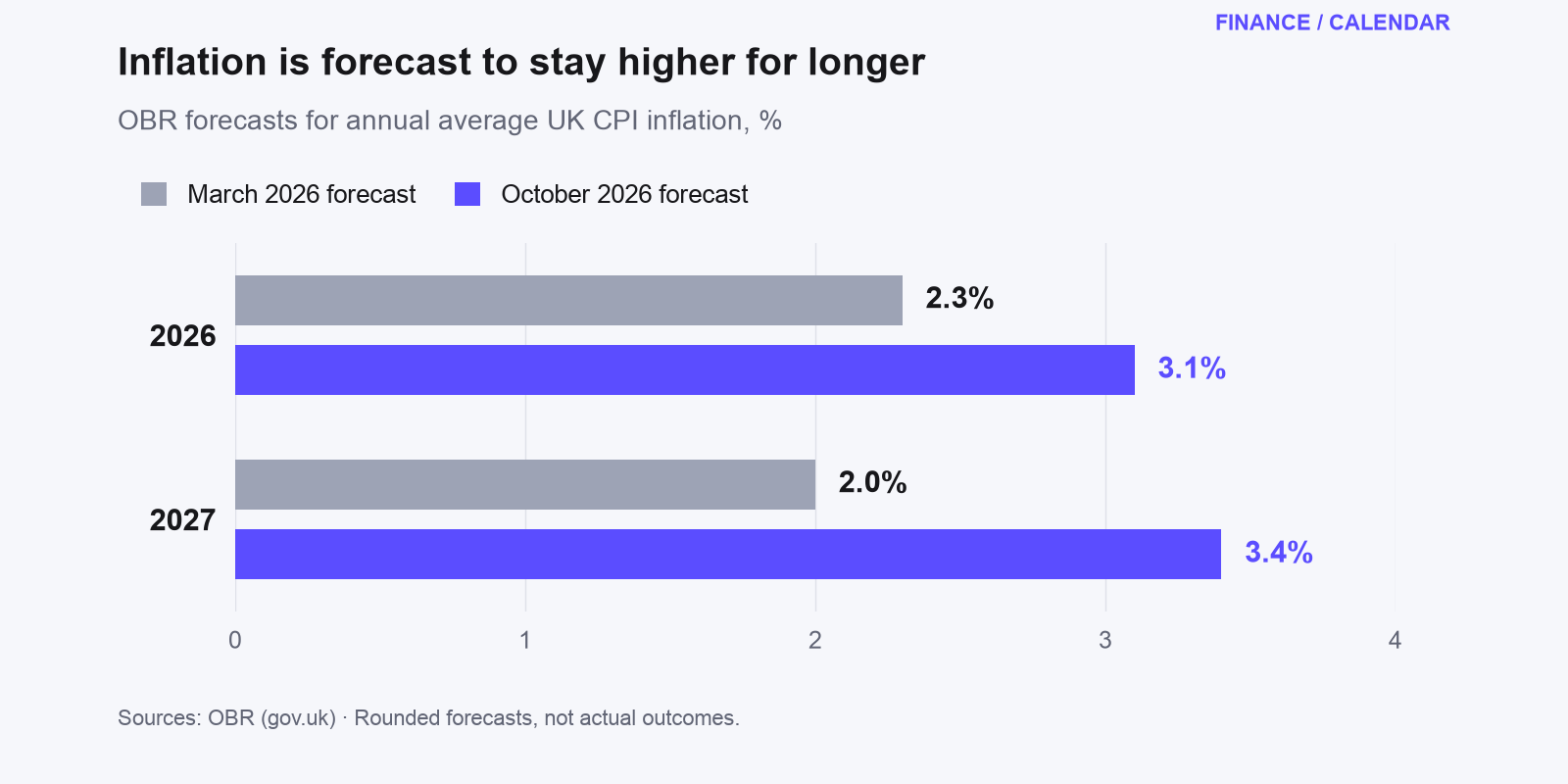
UK Budget 2026: why households may still feel squeezed
A £100 energy payment offers help to eligible households, but higher inflation forecasts explain why lasting relief may take longer. We examine the numbers, eligibility and dates that matter.
US vs UK GDP growth: comparing annualised and quarterly rates
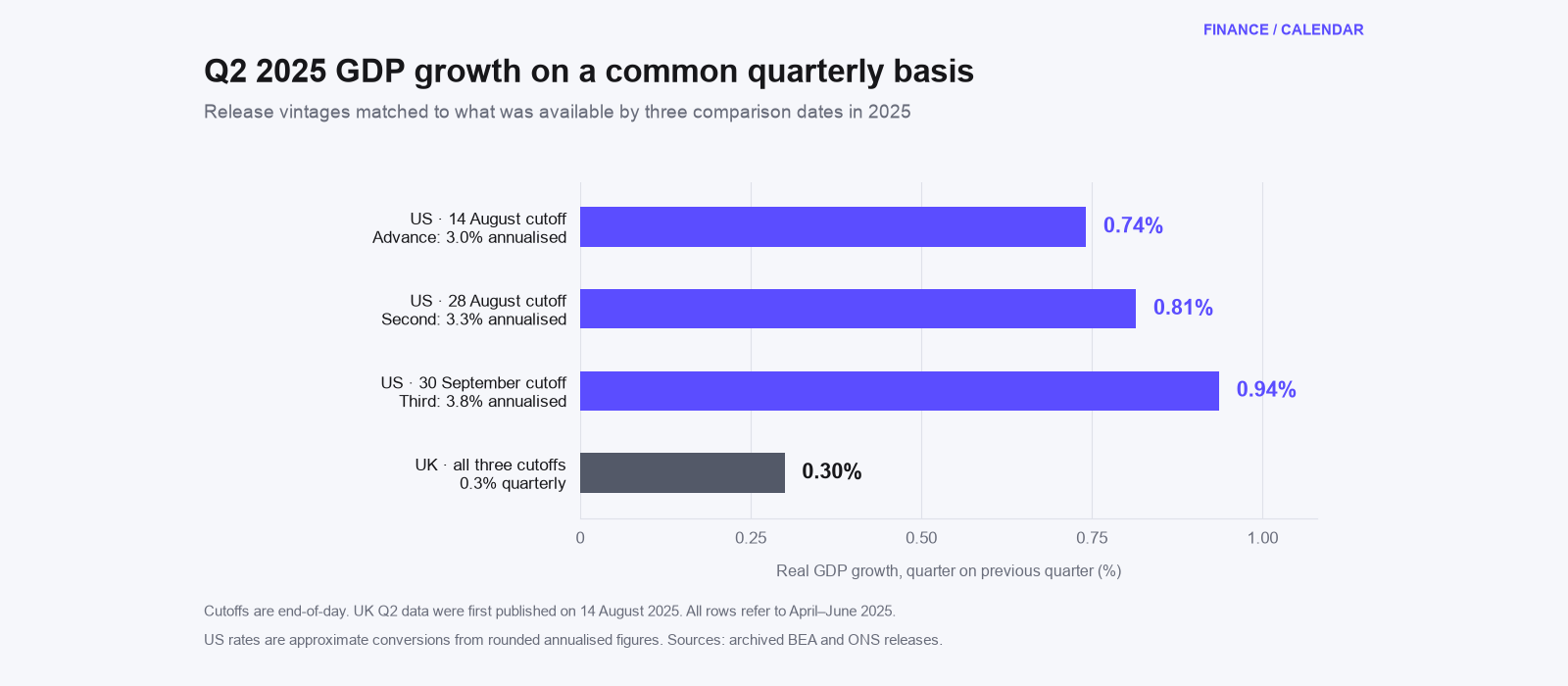
A worked Q2 2025 comparison shows how to convert US and UK GDP growth, match publication vintages and avoid confusing a growth revision with a change in GDP levels.